It’s 2026, Just Use Postgres | Tiger Data
Think of your database like your home. Your home has a living room, bedroom, bathroom, kitchen, and garage. Each room serves a different purpose. But they’re all under the same roof, connected by hallways and doors. You don’t build a separate restaurant building just because you need to cook. You don’t construct a commercial garage across town just to park your car.
That’s what Postgres is. One home with many rooms. Search, vectors, time-series, queues—all under one roof.
But this is exactly what specialized database vendors don’t want you to hear. Their marketing teams have spent years convincing you to “use the right tool for the right job.” It sounds reasonable. It sounds wise. And it sells a lot of databases.
Just Use Postgres for Everything | Amazing CTO
We have invited complexity through the door. But it will not leave as easily.
One way to get complexity out of the door, is simplifying your stack. Reduce the moving parts, speed up development, lower the risk and deliver more features in your startup is “Use Postgres for everything”. Postgres can replace - up to millions of users - many backend technologies, Kafka, RabbitMQ, Mongo and Redis among them. This makes every application easier to develop, scale and operate.
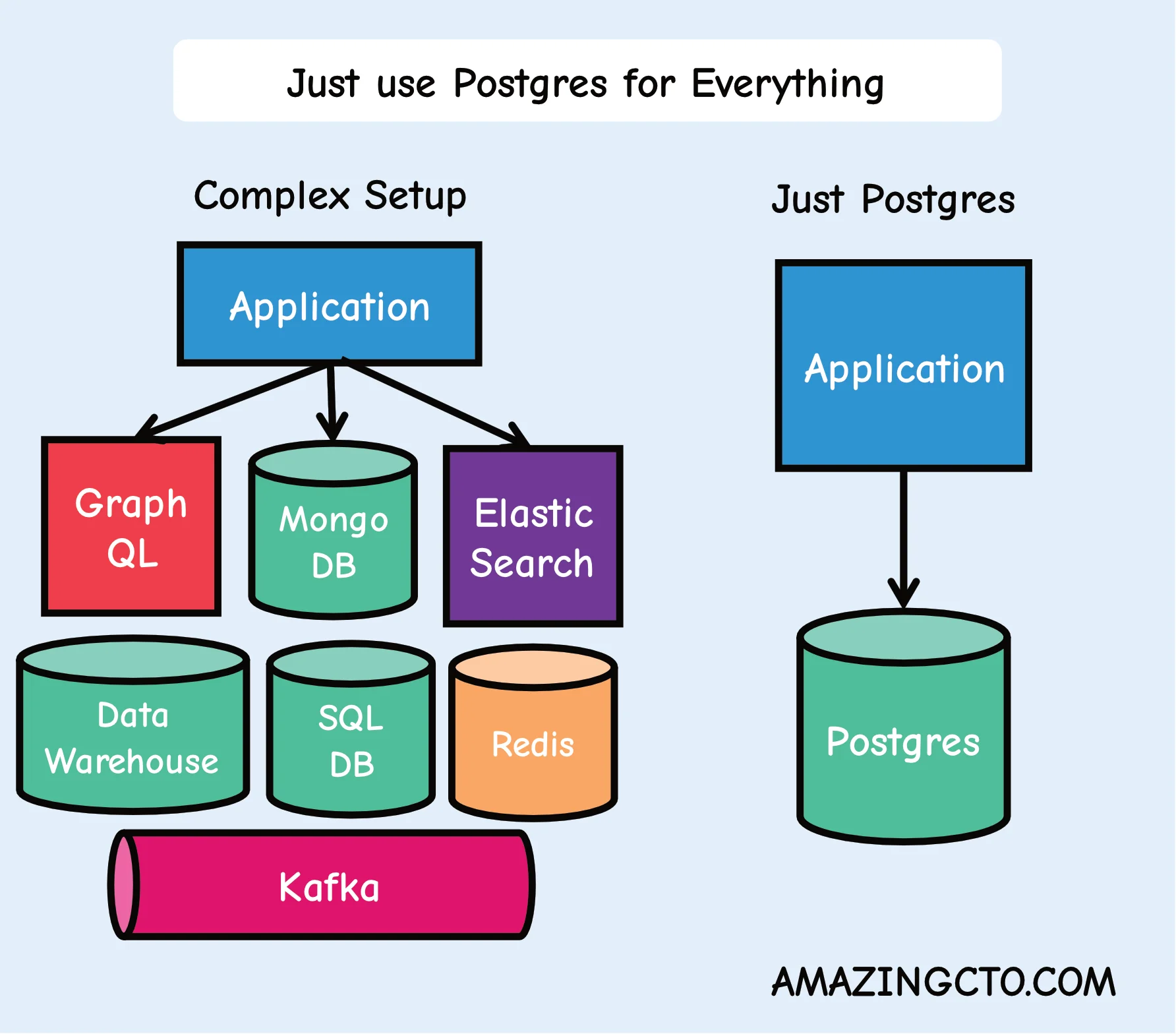
Less moving parts means fewer developers for parts that don’t provide value or just replicate existing functionality (frontend) and more developers on parts (like the backend) that does provide value to customers. What if you could increase feature output without higher costs? For developers: What about a lower cognitive load? You really deeply understand all moving parts? No more imposter syndrome?
What is PostgreSQL?
PostgreSQL (Postgres) is an open-source relational database management system that supports both SQL and NoSQL workloads. Unlike specialized databases, Postgres can serve as a cache, message queue, document store, analytics engine, and more - making it an ideal choice for reducing technology stack complexity.
Why Choose PostgreSQL Over Multiple Specialized Tools?
Startups typically use Redis for caching, MongoDB for documents, Kafka for messaging, and Elasticsearch for search - creating operational overhead, multiple failure points, and cognitive load for developers.
PostgreSQL can replace most of these specialized tools for applications serving up to millions of users, delivering:
- faster feature development
- reduced operational overhead
- single point of expertise instead of multiple technologies
- unified monitoring, backup, and scaling strategies
Just Use Postgres
- Caching instead of Redis
- Use Postgres with UNLOGGED tables and TEXT as a JSON data type. Use stored procedures or do as I do, use ChatGPT to write them for you, to add and enforce an expiry date for the data just like in Redis.
- Message queue instead of Kafka
- Use Postgres as a message queue with SKIP LOCKED (if you only need a message queue). Or as a job queue in Go with River
- Data warehouse
- Use Postgres with Timescale as a data warehouse. Use DuckDB for S3 integration.
- Data lake
- Use Postgres together with DuckDB as a data lake. There is a product for this called DuckLake, with Postgres as the catalog.
- In-memory OLAP
- Use Postgres with pg_analytics as an in memory OLAP with Apache Datafusion
- Document database instead of MongoDB
- Use Postgres with JSONB to store Json documents in a database, search and index them. If you need a more drop-in like replacement, use DocumentDB.
- Cron daemon
- Use Postgres as a cron demon to take actions at certain times, like sending mails, with pg_cron adding events to a message queue.
- Geospatial queries
- Use Postgres for Geospatial queries.
- Full-text search instead of Elastic
- Use Postgres for Fulltext Search.
- JSON API generation
- Use Postgres to generate JSON in the database, write no server side code and directly give it to the API.
- Auditing
- Use Postgres with auditing with pgaudit
- GraphQL delivery
- Use Postgres with a GraphQL adapter to deliver GraphQL if needed.
- Vector database
- Use Postgres with pgvector for embeddings and AI similarity search instead of specialized vector databases.
- Session store
- Use Postgres for web session management instead of Redis with proper indexing on session IDs and expiration timestamps. Use hstore for a key value store. s Rate limiting
- Use Postgres for API rate limiting with atomic updates and time-based windows instead of Redis counters.
- Distributed locks
- Use Postgres advisory locks for coordination between processes and services.
- Event sourcing
- Use Postgres for event-driven architectures with proper ordering and atomic event storage.
- Testing database
- Use Postgres transactions for ephemeral test databases, rolling back after each test for clean state. Use Postgres template databases for fast and easy database creation for tests.
- Metrics and monitoring
- Use Postgres with pg_stat_statements for application performance metrics.
- Webhooks
- Use Postgres with HTTP extensions to send HTTP notifications on data changes.
- File storage metadata
- Use Postgres for file metadata and large object storage instead of separate file management systems.
- Secure cryptography
- Use pgcrypto for secure cryptography.
- Scale with Postgres
- Scaling databases often happens with partitioning. Use Postgres partman to scale your database.
- Multi-tenancy
- Use Postgres row-level security for SaaS applications with tenant isolation.
- Scheduled jobs
- Use Postgres with pg_timetable for complex job scheduling beyond simple cron.
Postgres is becoming like Linux. Linux replaced all the other unix/bsd based operating systems into one system - OpenBSD still exist are great, they bring great ideas but have in the grand scheme of things have neglectable market share to the point many people haven’t heard of them. Linux has a development model with modules and userland code, where everyone can participate - and new inventions in operating systems can be implemented. The same way Postgres absorbs good ideas of other databases and implements them in a way that is easy to use in existing code bases. With the marketing power and reach of Postgres.
There I’ve said it, just use Postgres for everything.
How to Install PostgreSQL Extensions
PostgreSQL’s power comes from its extensive extension ecosystem. Here’s how to install extensions to unlock Postgres’s full potential:
- Connect to the PostgreSQL database
First, connect to your PostgreSQL database using the psql command-line tool or any PostgreSQL client:
psql -U username -d database_nameReplace username with your PostgreSQL username and database_name with your database name.
- Check for available extensions
List all available extensions to see what’s ready to install:
SELECT * FROM pg_available_extensions;- Install the extension
Install an extension using the CREATE EXTENSION command:
CREATE EXTENSION extension_name;For example, to install the pgvector extension for key-value pairs:
CREATE EXTENSION vector;- Verify the installation
Confirm the extension installed correctly:
SELECT * FROM pg_extension;FAQ
- Q: But what about single points of failure? A: You mean like having five different systems that can each break? Right now you have Redis, Kafka, and MongoDB. That’s three points of failure, not one. SLAs drop fast, with three systems at 99.9% each, the SLA is 99.7%. With Postgres, you have one system at 99.9%, and you’re done.
- Q: Won’t Postgres be too slow for caching/messaging? A: Instagram uses Postgres. They have more users than you. Your startup with 10,000 users doesn’t need Redis performance. You need developer productivity and operational simplicity. When you actually hit Postgres limits - not when you think you will - then add specialized tools.
- Q: My senior developers will revolt if I remove their favorite tools A: Good senior developers care about shipping features, not playing with toys. Show them the DevEx improvement: one connection pool, one monitoring dashboard, one backup strategy. If they still complain, they’re not as senior as they think. Real developers want to solve hairy feature challenges, not play with more toys.
- Q: This sounds like technical debt waiting to happen A: Technical debt is having six different query languages, four different monitoring tools, and three different backup strategies. Postgres for everything is technical credit - you’re investing in simplicity that pays dividends later.
- Q: How do I sell this to investors/board members? A: “We reduced our operational overhead by 60% and increased feature delivery speed by 50%.” They don’t care about your tech stack. They care about results.
Just Use Postgres
src: Just Use Postgres - 2024-09-15
One of the more brain-bending articles I’ve read in the past couple years was Stephan Schmidt’s Just Use Postgres for Everything.
Earlier this year, I spun up a greenfield tech project and realized that as a solo developer / tech co-founder, my limitations were mostly around operational overhead and not code and features. Just Use Postgres let me simplify the Infra and DevOps stack by relying more on code. This is a great trade off for a move-fast, prototype-heavy, super-early stage startup.
It worked. Really well.
I ended up building a simple webstack with Elixir, Phoenix and Liveview on top of Postgres and that’s just about it. I did some simple CICD with github actions. This setup will likely last me thru my next two or three eng hires.
UPDATE 2026-01: I’m up to an eng team of 5 and we are just now moving away from the “Just Use Postgres” to Still Mostly Using Postgres except for some docker sidecars for one off work such as pdf generation and also Oban (which is itself backed by Postgres, so the theme holds). No regrets, it’s been a very positive decision in hindsight.
The Core Idea
The core concept of “Just Use Postgres” is simple: shift complexity away from devops and into code.
Fewer moving parts means you move faster. More importantly, you can make architectural changes faster. When your infrastructure is basically “one Postgres instance,” new developers can get the full stack running on their laptop in minutes, not days.
What Postgres Replaced
Here’s what I didn’t need:
Elasticsearch/Typesense for search. Postgres has full-text search and trigram matching built in. I wrote about this in my Postgres Text Search 101 post. For an early-stage product, it’s more than good enough.
Redis/RabbitMQ for job queues. Postgres can be a perfectly fine job queue. SELECT … FOR UPDATE SKIP LOCKED gives you a reliable, transactional work queue without adding another service to your stack. Sequin has a great writeup on building your own SQS or Kafka with Postgres if you want to see how far you can push this.
Redis/Memcached for caching. JSONB columns and materialized views handle most of the caching patterns I needed. Unlogged tables work great for ephemeral data you’d normally throw in Redis. As an odd but positive side effect, when your data and your cache are on the same machine, you eliminate an entire class of cache invalidation headaches.
A separate key-value store. JSONB columns are a schemaless key-value store that also happens to support indexing and querying. It’s not as fast as Redis for hot-path lookups, but it’s more durable. It’s simpler than adding Mongo.
UPDATE 2026-01: AI/LLMs are unreasonably good at querying JSONB columns. They are good at SQL in general, but if Postgres’s somewhat odd JSONB syntax bothered you, AI makes it easier.
Why It Works
The conventional wisdom is that you should use the best tool for each job. This sounds reasonable until you realize that “best tool for the job” has a hidden cost: every tool you add is another thing that can break, another thing to deploy, another thing new hires need to learn, and another thing keeping you up at night.
The best tool for the job is often the tool you already have running, as long as it can do the job.
Postgres can do a surprising number of jobs. Not all of them optimally. But at early stage, optimal doesn’t matter. Speed of iteration matters. Simplicity of deployment matters. Being able to reason about your entire system matters.
This is the same principle I wrote about years ago in Principles of Scalable Architectures: simple as possible, as few components as possible. “Just Use Postgres” is that principle taken seriously.
When It Breaks Down
I’m not going to pretend this works forever. It doesn’t.
When your search queries start taking hundreds of milliseconds and you’ve exhausted your indexing options, it’s time for a dedicated search engine. When you’re processing tens of thousands of jobs per second, you probably want a real message broker. When you need sub-millisecond cache lookups at massive scale, Redis earns its keep.
But here’s the thing: you’ll know when you get there. And when you do, you’ll be migrating one well-understood component at a time, not untangling an operational ball of spaghetti.
Just Use Postgres
Are you early stage? Then start with Postgres. Use it for everything you can. Add complexity only when your scale forces your hand.
You’ll ship faster, sleep better, and (hopefully) spend your limited engineering bandwidth on stuff that actually matters to your customers.